
Below is a quick overview of Joomla basics, along with some information regarding the underlying OOP (Object-Oriented Programming) and MVC (Model-View-Controller) architecture that Joomla uses and the web applications we build.
Once that general framework is grasp, the way we build all our web applications and reports will by default fall in place.
The MVC and OOP videos below were found with a limited search and just for a quick reference. Joomla's structure regarding MVC and OOP is the same as with Python and JavaScript use (and many other languages), so any previous knowldege of Python and JavaScript will apply and be familiar.
Joomla Training
In the LinkedIn Joomla 4 training below, which pertains to our current Joomla 5 as well, there are several sections that are outside of what to initially learn with Joomla, such as for now please skip these sections. We have specific ways we work with those.
Skip these:
Modifying Global Configuration
7. Extending Joomla!
8. Working with Templates
9. Users, Access Control Lists, and Workflows
Instead, focus on this video and sections #2 and #3 below:
Interface Tour
https://www.linkedin.com/learning/joomla-4-essential-training/a-quick-tour-of-the-joomla-interface
2. Understanding Categories and Articles (section)
https://www.linkedin.com/learning/joomla-4-essential-training/creating-and-editing-categories-for-your-site
3. Understanding Menus (section)
https://www.linkedin.com/learning/joomla-4-essential-training/understanding-and-configuring-menus
5. Using Modules (section)
https://www.linkedin.com/learning/joomla-4-essential-training/understanding-module-positions
Joomla OOP and MVC
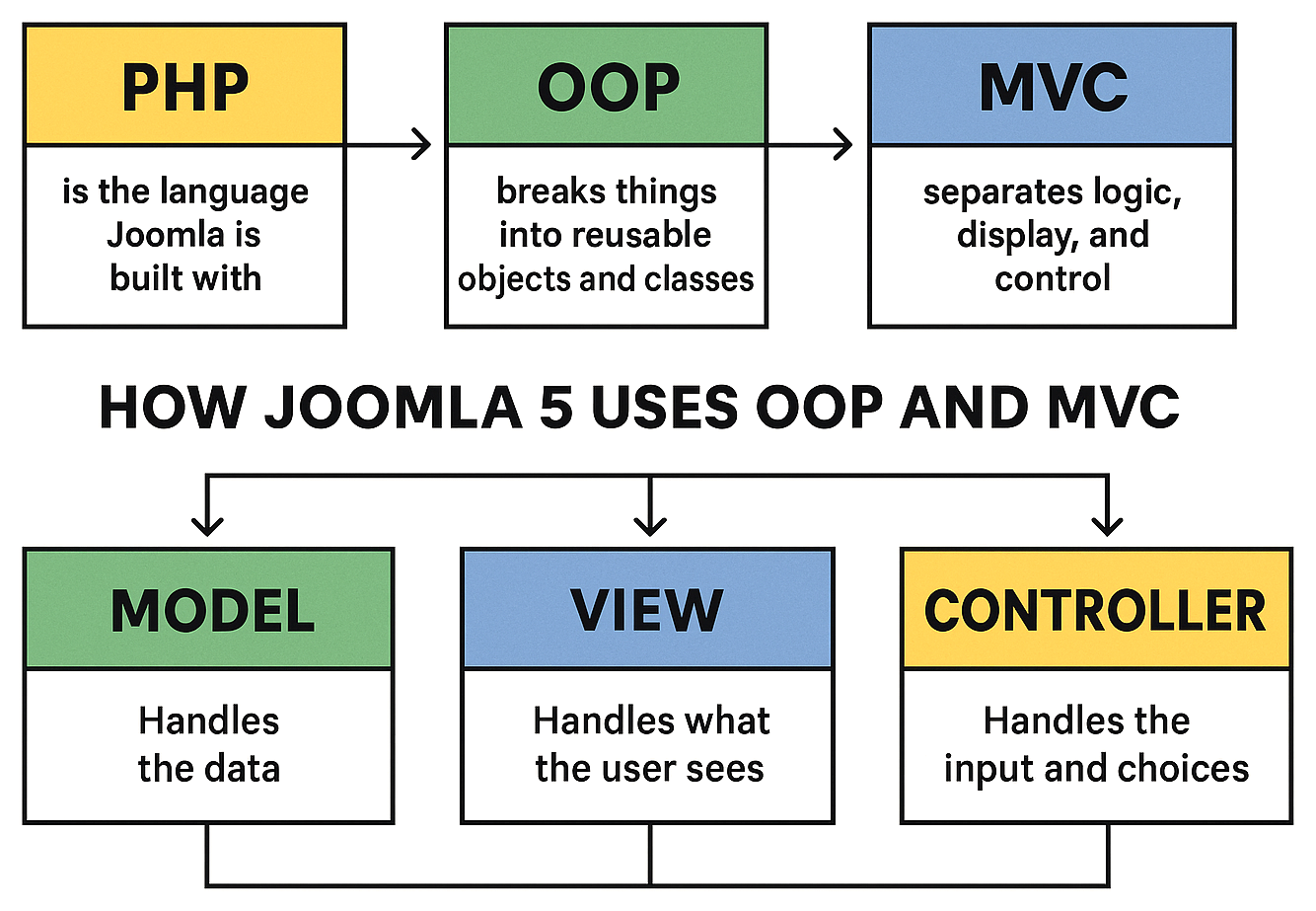
Like Python, Joomla is built using Object-Oriented Programming (OOP) and follows the Model-View-Controller (MVC) design pattern. It organizes its code into classes and objects (OOP), and separates responsibilities into Models, Views, and Controllers (MVC). And how we build all our web applications
MVC
https://www.youtube.com/watch?v=kk_JmicFVjE
How Joomla explains it:
https://manual.joomla.org/docs/building-extensions/components/mvc/mvc-overview
OOP
https://www.youtube.com/watch?v=1SujQeVK4MU
https://www.youtube.com/watch?v=yrFr5PMdk2A
How Joomla explains it:
https://docs.joomla.org/Getting_Started_with_Object_Oriented_Programming
CRUD (Create, Read, Update, Delete) Database Operations
Since Joomla is a database-driven CMS, it inherently supports CRUD operations (Create, Read, Update, Delete). For our custom web applications, we extend Joomla using the Fabrik web application component's interface.
Fabrik's interface handles CRUD operations in the following ways:
Create – Creating lists (database tables), adding form elements (database columns), and using forms to insert data into the database.
Read – Displaying list views, executing database queries to return records, generating reports, and our data dashboards and visualizations.
Update – Editing and updating existing records through form submissions.
Delete – Removing records directly from lists or forms.
Fabrik has its own PHP framework built on top of Joomla's PHP framework, and we use much of that when interacting directly with Fabrik, such as Fabrik's PHP form plugin:
https://fabrikar.com/forums/index.php?wiki/php-form-plugin
However, Fabrik still uses Joomla's framework and when we're coding our own custom PHP we're almost always directly using Joomla's framework, such as Fabrik even mentions in their common PHP tasks below:
https://fabrikar.com/forums/index.php?wiki/php-common-tasks/&redirect=common-php-tasks
And when we're doing database queries via PHP:
https://manual.joomla.org/docs/general-concepts/database
https://manual.joomla.org/docs/general-concepts/database/select-data
https://manual.joomla.org/docs/general-concepts/database/query-results
https://manual.joomla.org/docs/general-concepts/database/insert-data
https://manual.joomla.org/docs/general-concepts/database/update-data
https://manual.joomla.org/docs/general-concepts/database/delete-data
Database Interaction
With our web applications, and Joomla in general, being database-driven and us building custom database tables, we of course do a large amount of database interactions. The below videos pertain to what we do:
Programming Foundations: Databases
https://www.linkedin.com/learning/programming-foundations-databases-2/understanding-databases-benefits-of-structured-data
SQL: Data Reporting and Analysis
https://www.linkedin.com/learning/sql-data-reporting-and-analysis-18082247/get-familiar-with-phpmyadmin
Intermediate SQL: Data Reporting and Analysis
https://www.linkedin.com/learning/intermediate-sql-data-reporting-and-analysis/what-can-you-do-with-intermediate-sql
Relational database tables
https://www.linkedin.com/learning/php-with-mysql-essential-training-1-the-basics/relational-database-tables-14192191?resume=false&u=57078329
PHP Coding
PHP of course is huge, with over 1000 functions, and very complex enterprise-level projects are built with it. Most of our PHP coding is basic and intermediate, barely touching the surface of PHP, mainly implementing custom CRUD functions. With that being the case, starting with the below videos and sections would be recommended, and then branch out from there over time:
PHP Essential Training:
Variables:
https://www.linkedin.com/learning/php-essential-training-2017/variables-14759660
These sections:
3. Explore Data Types
4. Control Structures: Logical Expressions
5. Control Structures: Loops
Debugging:
https://www.linkedin.com/learning/php-essential-training-2017/debug-and-troubleshoot-14761609